Xuliang Zhu
在管理员模式下打开 PowerShell(右键单击并选择“以管理员身份运行”)
输入wsl --install命令,若果输出help信息,说明已经安装过,可以跳过这一页。遇到任何问题,查看排查安装问题一文。
wsl --install
需要重启计算机。
下载Docker Desktop并按照安装说明操作
安装后,从 Windows 开始菜单启动 Docker Desktop,然后从任务栏的隐藏图标菜单中选择 Docker 图标。 右键单击该图标以显示 Docker 命令菜单,然后选择“设置”。
确保在“设置”>“常规”中选中“使用基于 WSL 2 的引擎”。
下载VcXsrv并根据提示安装。
安装结束后,打开xlaunch.exe,勾选 Disable access control ,其他选项保持默认(并允许XcvSrv通过防火墙)
以管理员身份打开PowerShell输入 set-executionpolicy remotesigned 并选择Y
set-executionpolicy remotesigned
后台运行Docker,打开Powershell,下载DarkSHINE Docker和脚本:
docker pull ykrsama/darkshine-simulation
git clone https://gitlab.com/ykrsama/darkshine-docker.git
测试
cd darkshine-docker
./docker-win.ps1
DSimu -b 100 # 读 default.yaml, 输出 dp_simu.root
DDis # 事例显示,读dp_simu.root
exit
新建一个CLion项目(New Project),选择一个模版,例如C++ Executable
到 Settings | Build, Execution, Deployment | Toolchains.
点+,选择Docker
设置Name, Server和Image
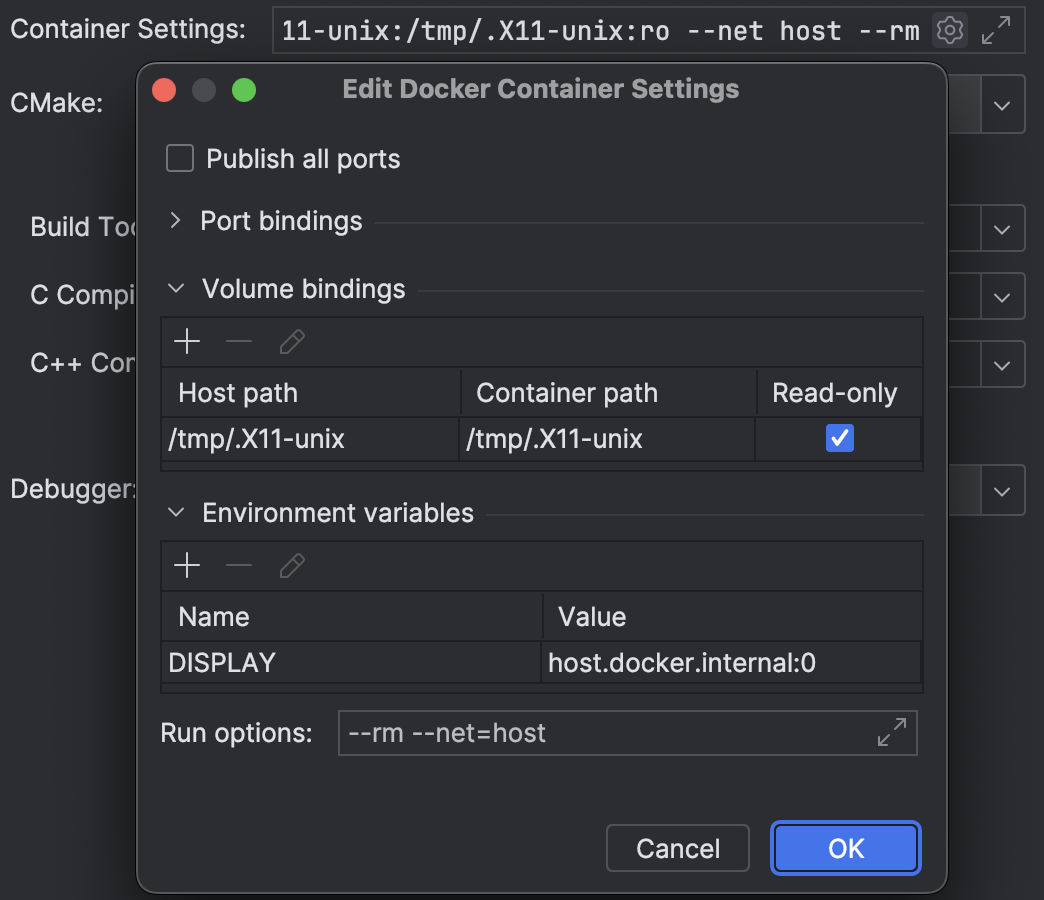
(可选)Container Settings,用于X11转发Docker图形界面
Volume bindings: /tmp/.X11-unix , /tmp/.X11-unix
/tmp/.X11-unix
Environment variables: DISPLAY , host.docker.internal:0
DISPLAY
host.docker.internal:0
Run options: --rm --net=host
--rm --net=host
到 Settings | Build, Execution, Deployment | CMake.
设置Toolchain为DarkSHINE Docker
Docker内cmake版本为 3.16,需要修改模版里的CMakeList.txt第一行为:
CMakeList.txt
cmake_minimum_required(VERSION 3.16)
Relaod CMake Project、编译、运行!